
OpenAI Codex CLI
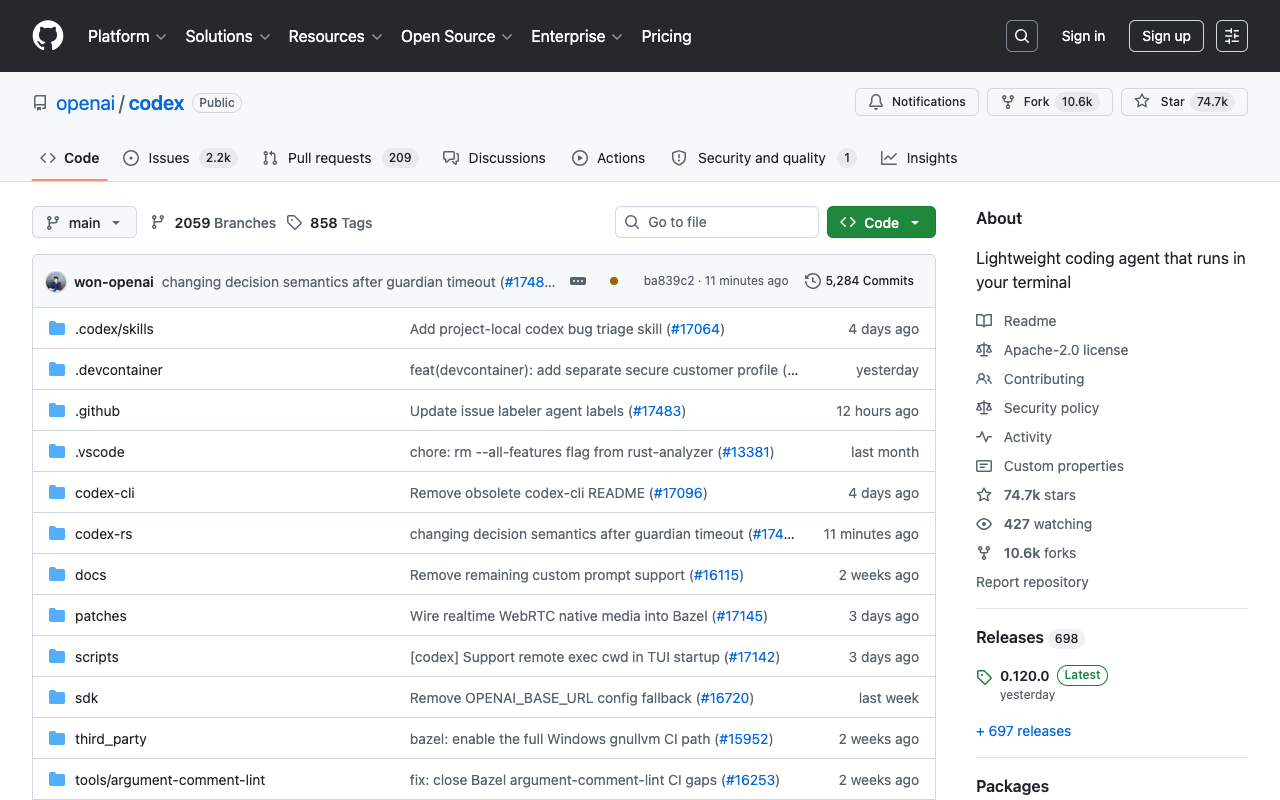
OpenAI's open source coding agent for the terminal. Free to install; you run it with a ChatGPT plan or your own API key.
Quick answers
- Is OpenAI Codex CLI free?
- The software is free: it is open source and costs nothing to install. Using it is not. You sign in with a ChatGPT plan (OpenAI lists CLI access from Plus, $20/month, upward) or with an OpenAI API key billed at standard per-token rates. Free and Go plans list Codex only in the ChatGPT desktop app.
- Is OpenAI Codex CLI open source?
- Yes. The CLI lives at github.com/openai/codex under the Apache-2.0 license and is written mostly in Rust. The models, the IDE extension and Codex Cloud are not open source.
- What is the latest version of OpenAI Codex CLI?
- 0.160.0, released on October 1, 2026 (checked October 5, 2026). OpenAI ships a new version every few days, so run codex --version to see yours, and update with npm i -g @openai/codex@latest or brew upgrade --cask codex.
- Can I use Codex CLI with my own API key (BYOK)?
- Yes. Run printenv OPENAI_API_KEY | codex login --with-api-key. You pay standard API prices per token, and Codex Cloud tasks are not available in this mode because they need a ChatGPT sign-in.
- Which model does Codex CLI use?
- OpenAI's docs recommend GPT-6.1 Sol for most work, GPT-6 Luna for cheaper repetitive tasks and GPT-6 Astra for the hardest problems. GPT-5.5 is retired from Codex on October 14, 2026.
- Does Codex CLI run on Windows?
- Yes, natively, with its own Windows sandbox. WSL2 is optional, and WSL1 is no longer supported.
Description
OpenAI Codex CLI is OpenAI's coding agent for the terminal. It is open source under the Apache-2.0 license, written mostly in Rust, and ships a new version every few days (0.160.0 on October 1, 2026). It reads your repo, edits files, runs commands inside a sandbox and checks its own changes, and it supports AGENTS.md, skills, MCP servers and non-interactive runs with codex exec for scripts and CI. It runs natively on macOS, Linux and Windows. The software is free, but using it is not: you sign in with a ChatGPT plan (CLI access is listed from Plus, $20/month) or with an OpenAI API key billed per token. The same account also works in the IDE extension for VS Code, Cursor and Windsurf, in the ChatGPT desktop app and in Codex Cloud. It is OpenAI's answer to Claude Code, Cursor's agent and Cline.
How to install
macOS or Linux (official install script)
curl -fsSL https://chatgpt.com/codex/install.sh | shWindows (PowerShell)
irm https://chatgpt.com/codex/install.ps1 | iexOr with npm, on any OS
npm install -g @openai/codexOr with Homebrew on macOS
brew install --cask codexSign in (ChatGPT account by default) and start the agent in your project folder
codex login
codex
Preview
Detailed Evaluation
Key strengths
Open source under Apache-2.0
The CLI code is on GitHub, you can read and fork it, and OpenAI ships new versions every few days.
Two ways to sign in
Use your ChatGPT plan's allowance with no separate API bill, or bring an API key to bill usage per project.
Configurable sandbox
Three modes (read-only, workspace-write and full access) plus approval rules decide what the agent can touch without asking.
AGENTS.md, skills and MCP
Give the agent repo-level instructions, reusable skills and external tools like GitHub, Supabase or Linear through MCP servers.
One account across CLI, IDE, app and cloud
The same sign-in works in the terminal, the VS Code/Cursor/Windsurf extension, the ChatGPT desktop app and Codex Cloud, with pull request reviews via @codex on GitHub.
Limitations to consider
Usage limits depend on your plan
Plus has a 5-hour message window and weekly limits; heavy daily use pushes you towards Pro (from $100/month) or an API key.
API key mode loses cloud features
With BYOK you pay standard per-token API prices and cannot run Codex Cloud tasks, which need a ChatGPT sign-in.
Fast-moving target
New releases land every few days and models are retired often (GPT-5.5 leaves Codex on October 14, 2026), so configs and habits need regular checks.
CLI not listed on Free and Go
OpenAI's plan table lists Codex in the desktop app for Free and Go, but CLI access starts at Plus.
Standout Feature
It is OpenAI's own agent, open source, and one account covers the terminal, the IDE extension, the desktop app and cloud tasks, so you can start a task in one place and continue it in another.
Comparison with Alternatives
Versus Claude Code, it is the equivalent tied to OpenAI's models and ChatGPT plans, with an open source CLI. Versus Cursor, it is a terminal agent you can pair with any editor rather than a full IDE. Versus Cline, it has official support and plan-based pricing instead of only paying for API tokens.
Alternatives to consider
Sources
Ideal User
Developers who work in the terminal, want OpenAI's official open source agent, care about controlling the sandbox, and already pay for a ChatGPT plan they can draw on. Also a fit for teams that prefer an API key to separate spend by project.
Learning Curve
Installing and signing in takes a couple of minutes. Getting the most out of AGENTS.md, skills, MCP servers and sandbox rules takes reading the docs and some practice. If you have used Claude Code or Cline, you will adapt in hours.
Best For
- Developers who live in the terminal and want OpenAI's official agent
- People already paying for ChatGPT Plus, Pro or Business who want to use that allowance for coding
- Teams that want to control what the agent can read, write and run
- Automating code tasks in CI with codex exec or the official GitHub Action
- Users who want an open source agent they can inspect
Not Ideal For
- People who want a visual app builder rather than a coding agent
- Free or Go ChatGPT users who need the CLI (those plans list Codex only in the desktop app)
- Teams that need an SLA on the tool itself